Gemini Skills are saved prompts inside Gemini in Chrome that you can reuse on the page you are viewing or across selected tabs. The update matters because it turns repeated AI requests into one-click actions, giving Chrome a more consistent role in how people shop, read, compare, and organize information online.
What Gemini Skills are and why they matter now
Anyone who uses AI often runs into the same annoyance sooner or later: you finally land on a prompt that works, then have to rebuild it the next time. Maybe it compares laptops, pulls deadlines from a long page, or rewrites a recipe around a food restriction. The work is not hard, exactly. It is just repetitive. Gemini Skills are Google’s answer to that problem.
Google says you can save a prompt from your Gemini chat history as a Skill, then run it again later without typing the whole thing out from scratch. In practice, that means a prompt can stop being a one-time instruction and start becoming a reusable tool. That shift is what makes this update worth paying attention to right now.1
How Gemini Skills work in Chrome
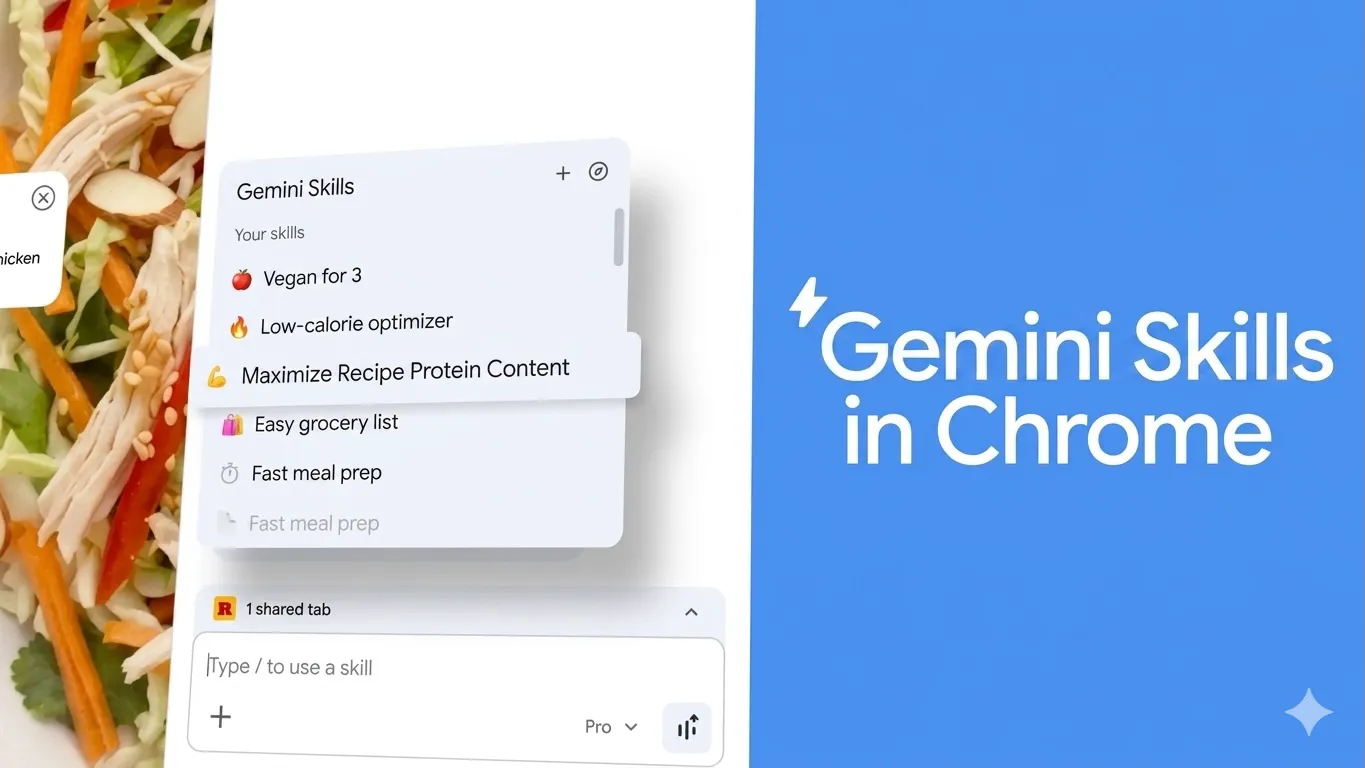
The setup is fairly direct. Google says you can save a prompt as a Skill, trigger it later by typing a forward slash in Gemini in Chrome or by using the plus button, and edit the Skill whenever you want. Gemini in Chrome uses content from your current tab by default, and on desktop it can also work with up to 10 shared tabs at once.
That last part is where the feature becomes more useful than it may sound at first. A saved prompt is not just a clipboard shortcut. It can run against live browser context. If you are comparing products, scanning several pages, or pulling details from multiple sources, Gemini can use those open tabs as working material instead of making you paste everything into a chat box.2
What you can actually do with Gemini Skills
Google’s own examples are grounded in everyday tasks. Skills can calculate protein macros for a recipe, compare specs across shopping tabs, and scan long documents for details that matter. Google also says it has written example Skills that users can save and edit for common jobs, such as checking product ingredients or comparing gift ideas based on price and the recipient’s interests.1
That opens the door to several real uses:
Shopping
A saved Skill could check warranty details, return policies, pricing, and standout features across several product pages. Instead of repeating the same comparison prompt over and over, you run one saved instruction and let Gemini organize the differences.
Work and research
If part of your day disappears into browser tabs, this feature has obvious appeal. One Skill might pull deadlines and action items from long pages. Another could compare claims across multiple articles or vendor pages. Chrome Help already positions Gemini in Chrome as a tool for key takeaways, concept clarification, and finding answers inside the browser, so Skills build naturally on that existing behavior.2
Food, travel, and personal planning
This is where the feature may land with more casual users. A saved prompt could convert recipes, compare hotel policies, or gather the most important details from several tabs before you make a decision. It is not a dramatic change on the surface, but it removes a surprising amount of friction from tasks people repeat every week.
Why this update is getting attention
The bigger story is not just saved prompts. It is what saved prompts suggest about where Chrome is headed.
Google has been steadily expanding Gemini in Chrome beyond page summaries. Chrome Help says Gemini in Chrome can get key takeaways, clarify concepts, answer questions, and use the current tab or additional open tabs for context. Google’s earlier announcements also described deeper integrations through Connected Apps, including Gmail, Calendar, YouTube, Maps, Google Shopping, and Google Flights, along with broader features such as auto browse.3
Seen together, these updates point in the same direction: Google is trying to make Chrome a place where AI handles repeated browser-based tasks, not just one-off questions. Skills fit that pattern neatly. They do not replace browsing. They sit on top of it and make familiar actions easier to repeat.4
What most people may miss
It is easy to hear “saved prompts” and shrug. That would miss the point.
The value here is not only speed. It is consistency. When a prompt works well, people tend to keep a version of it in notes, old chats, or random documents. Skills pull that behavior into Chrome itself. Instead of hunting down the wording that worked last time, users can keep those routines inside the browser and call them up when they need them.1
That may sound modest, but modest updates often end up changing behavior more than flashy ones do. If you already use AI while browsing, even a small cut in repetition can make the tool more likely to stay in your routine. That is part of why this update stands out. It is tied to everyday habits, not edge cases.
Limits, trade-offs, and what to watch
There are still some clear boundaries. Google says Gemini in Chrome is rolling out and is not available to everyone yet. Chrome Help says it is available for users 18 and older in the U.S., Canada, India, and New Zealand on Chromebook Plus, Mac, or Windows devices, while the Skills announcement says the feature is rolling out on Mac, Windows, and ChromeOS for users whose Chrome language is set to English (U.S.).1,2
There is also the privacy question. Google says Gemini Skills use the same safeguards as prompts in Gemini in Chrome and will ask for confirmation before taking certain actions, such as sending an email or adding a calendar event. That is an important safeguard, but it also underlines that these tools are meant to do more than summarize a page.
And, as always with AI, the output still depends on the prompt. A saved weak prompt stays weak. Skills remove repetition, but they do not remove the need to think clearly about what you are asking for.
What Gemini Skills mean going forward
Not everyone will care about Gemini Skills the moment they appear in Chrome. But for people who already use AI to compare, summarize, rewrite, and organize what they see online, this update is easy to understand and easier still to imagine using.
The deeper point is this: Google is not just adding another AI feature to Chrome. It is trying to make repeated AI workflows part of ordinary browsing. If that approach keeps expanding, Gemini Skills could become one of those quiet updates that seemed minor at launch, then gradually became part of how people use the web every day.
Citations
- Ismail, Hafsah. “Turn Your Best AI Prompts into One-Click Tools in Chrome.” Google, 14 Apr. 2026.
- “Use Gemini in Chrome – Computer.” Google Chrome Help, Google.
- Torres, Mike. “Chrome Gets New Gemini 3 Features, Including Auto Browse.” Google, 12 Feb. 2026.
- “The Next Generation of AI in Chrome.” Google Chrome.