OpenAI GPT-5.2 is the latest upgrade in the GPT-5 series, built to help us write, summarize, plan, and complete longer work that has multiple steps. GPT-5.2 comes in three options—Instant, Thinking, and Pro—so we can pick speed or depth depending on the task, in ChatGPT and in the API.1
Key takeaways
- GPT-5.2 ships as Instant, Thinking, and Pro so we can match the model to the job.
- OpenAI says GPT-5.2 is better at long documents, tool-based tasks, images, and multi-step work products (like slides and spreadsheets).
- OpenAI’s safety write-up for GPT-5.2 includes testing for jailbreaks, prompt injection, hallucinations, and sensitive topics (like self-harm and mental health).
- We get better results from GPT-5.2 when we set a clear goal, lock the format, and ask for a quick self-check before final output.
What is OpenAI GPT-5.2, and what changed in GPT-5.2?

GPT-5.2 is OpenAI’s newest model family for professional knowledge work—things like drafting content, organizing information, interpreting images, and completing longer requests that need structure. OpenAI says GPT-5.2 is designed to be better at long-context work, using tools, and handling complex, multi-step projects end-to-end.
Instead of one “single” experience, OpenAI presents GPT-5.2 as a set of options that let us choose speed or deeper work, depending on what we need.1
Which GPT-5.2 option should we use: Instant, Thinking, or Pro?
OpenAI describes three options for GPT-5.2: Instant, Thinking, and Pro. Each is meant for a different pace and level of depth in the answer.
A simple way to choose a GPT-5.2 option
| GPT-5.2 option | When it fits | What we should expect |
| GPT-5.2 Instant | Quick drafts, short answers, fast rewrites | Fast turnaround for everyday tasks |
| GPT-5.2 Thinking | Longer summaries, comparisons, planning, “work products” | More structure and polish for harder tasks |
| GPT-5.2 Pro | High-stakes questions where quality matters more than speed | More careful output, fewer major mistakes in early testing (per OpenAI) |
If we are unsure, GPT-5.2 Thinking is usually the safest middle ground for anything longer than a couple paragraphs.
What kinds of work does GPT-5.2 handle well?
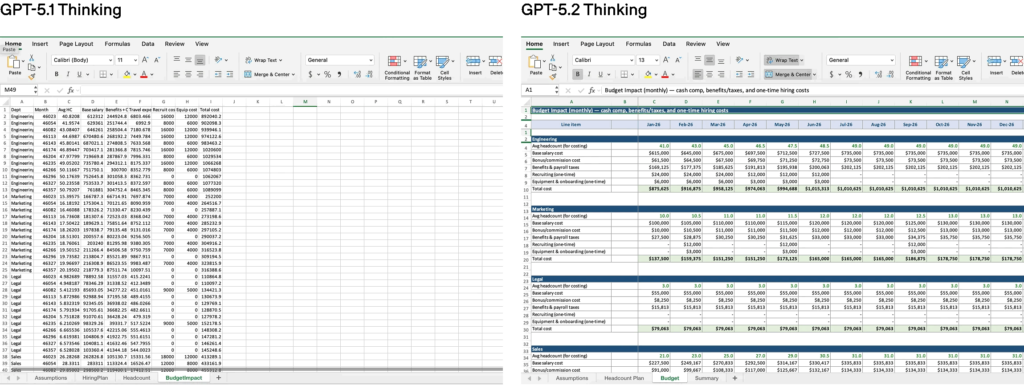
OpenAI highlights GPT-5.2 as strong for tasks people actually do at work, especially when the output needs to be organized and usable. Examples include creating spreadsheets, building presentations, writing code, understanding images, and working with long inputs.1
Common ways we can use GPT-5.2
- Turn rough notes into a clean outline
- Summarize long articles or reports into key points
- Create a plan (with steps, owners, and timelines)
- Draft a slide-by-slide presentation plan
- Explain what’s happening in an image or screenshot
- Compare options with pros, cons, and risks<sup>1</sup>
A real-world “time saved” signal
OpenAI reports that the average ChatGPT Enterprise user says AI saves 40–60 minutes per day, and heavy users report more than 10 hours per week. That is self-reported, but it helps explain the kind of work OpenAI is aiming at with GPT-5.2.
How do we get consistent results from GPT-5.2 without sounding robotic?
We do not need special terminology to get value from GPT-5.2. The main shift is how we ask.
OpenAI’s GPT-5.2 Prompting Guide recommends being explicit about the goal, the output format, and the constraints. It also suggests adding a quick “uncertainty” step so the model flags what needs verification.4
A reusable GPT-5.2 prompt template
- Goal: What we want, in one sentence
- Audience: Who it is for
- Inputs: Paste the source material or notes
- Format: Headings, bullets, tables, length limits
- Must include: Items that cannot be missing
- Must avoid: Words, claims, or tone we do not want
- Self-check: “List anything you are unsure about and what we should verify.”4
A simple “two-pass” workflow
1. Pass 1: Ask GPT-5.2 for a structured draft.
2. Pass 2: Ask GPT-5.2 to tighten wording, remove repeats, and label any assumptions.4
This keeps the final output cleaner and easier to trust.
What should we know about safety, reliability, and sensitive topics with GPT-5.2?
OpenAI published a GPT-5.2 system card update describing how it evaluates safety and failure modes. It includes testing across disallowed content, jailbreak attempts, prompt injection, and more, plus specific work around sensitive conversations such as self-harm and mental health topics.2
Two reliability habits that matter with GPT-5.2
- Ask for sources or supporting text when facts matter. If we do not provide sources, we should expect to verify key details ourselves.
- Ask for uncertainty. A short “what might be wrong?” step reduces overconfident output on unclear questions.4
OpenAI also notes it is rolling out an age prediction approach to apply additional protections to accounts believed to be under 18. This is described as early-stage work that will continue to evolve.2
Is GPT-5.2 available in ChatGPT, and what is the knowledge cutoff?
OpenAI’s release notes say GPT-5.2 is being released as the next upgrade to the GPT-5 series, and the three options (Instant, Thinking, Pro) have a knowledge cutoff of August 2025. In other words, GPT-5.2 starts with information up to that point unless it uses tools like web search.
The release notes also describe changes to how people choose reasoning options, including defaults that can vary by plan. The key point is that GPT-5.2 is intended to be a main option going forward, and the experience may differ slightly depending on the plan and rollout timing.5
Do we need to understand pricing or technical settings to use GPT-5.2?
Not for everyday use in ChatGPT. Most of the time, picking the right GPT-5.2 option and writing a clear request is enough.
If an organization connects GPT-5.2 through OpenAI’s API, OpenAI lists model names and pricing on the Introducing GPT-5.2 page. The pricing is based on units of text length, so longer inputs and longer outputs typically cost more in API usage.1
Frequently Asked Questions
What is OpenAI GPT-5.2 best for?
GPT-5.2 is best for long, structured tasks like summaries, planning, drafting, and multi-step work where we want organized output. OpenAI also calls out work like slides, spreadsheets, images, long documents, and tool-based tasks.1
What’s the difference between GPT-5.2 Instant and GPT-5.2 Thinking?
GPT-5.2 Instant is meant for quick turnaround on everyday tasks. GPT-5.2 Thinking is meant for harder work that benefits from more structure, polish, and step-by-step reasoning.5
Is GPT-5.2 “safe” to use for sensitive topics?
OpenAI publishes safety evaluation details for GPT-5.2 in its system card update, including testing for jailbreaks, prompt injection, and sensitive topics like self-harm and mental health. We should still use judgment, especially for personal or high-stakes situations.2
How do we get better results from GPT-5.2?
We should be specific about the goal, provide the source material, lock the output format, and add a short self-check that asks the model to flag uncertainty. OpenAI’s GPT-5.2 Prompting Guide recommends these kinds of structured patterns.4
What is GPT-5.2’s knowledge cutoff in ChatGPT?
OpenAI’s release notes state that GPT-5.2 models have a knowledge cutoff of August 2025. For newer topics, we should rely on web search or trusted sources.5
Citations
- OpenAI. “Introducing GPT-5.2.” OpenAI, 11 Dec. 2025.
- OpenAI. “Update to GPT-5 System Card: GPT-5.2.” OpenAI, 11 Dec. 2025.
- OpenAI. “Update to GPT-5 System Card: GPT-5.2.” OpenAI, 11 Dec. 2025.
- Singh, Mandeep, and Emre Okcular. “GPT-5.2 Prompting Guide.” OpenAI Cookbook, 11 Dec. 2025.
- OpenAI. “ChatGPT — Release Notes.” OpenAI Help Center, updated 11 Dec. 2025.