ChatGPT for Teens is a ChatGPT experience for users ages 13 to 17 that adds stronger safety protections, learning-focused features, and family controls. It includes Study Mode, homework reminders, Study Hours, age-aware safeguards, and parental settings designed to help teens use ChatGPT more responsibly for school, questions, and everyday tasks.1
Key Takeaways About ChatGPT for Teens
- ChatGPT for Teens applies added protections for users OpenAI identifies as being under 18.
- Study Mode can guide students through problems step by step instead of focusing only on final answers.
- Responsible Homework Reminders may encourage teens to work through assignments rather than asking ChatGPT to complete them.
- Study Hours can make Study Mode the default during selected periods.
- Parents can manage certain settings through linked accounts but cannot read or monitor a teen’s ChatGPT conversations.
- ChatGPT for Teens includes added safeguards for sensitive content, risky activities, and extended use.
- Early research on Study Mode has produced encouraging results, but longer-term research is still underway.
What Is ChatGPT for Teens?
ChatGPT for Teens is an age-aware ChatGPT experience created for users between ages 13 and 17.
Rather than providing teens with exactly the same experience as adults, OpenAI applies additional safeguards and learning-focused features intended for younger users.
The experience includes several parts:
- Study Mode
- Responsible Homework Reminders
- Study Hours
- Teen-specific safety protections
- Parental controls
- Break reminders
- Sensitive-image reminders
- Additional boundaries around emotional dependence and romantic interactions
OpenAI says ChatGPT for Teens may apply when a user states that they are between 13 and 17 or when its systems estimate that a user is under 18.
How Does Study Mode Work in ChatGPT for Teens?
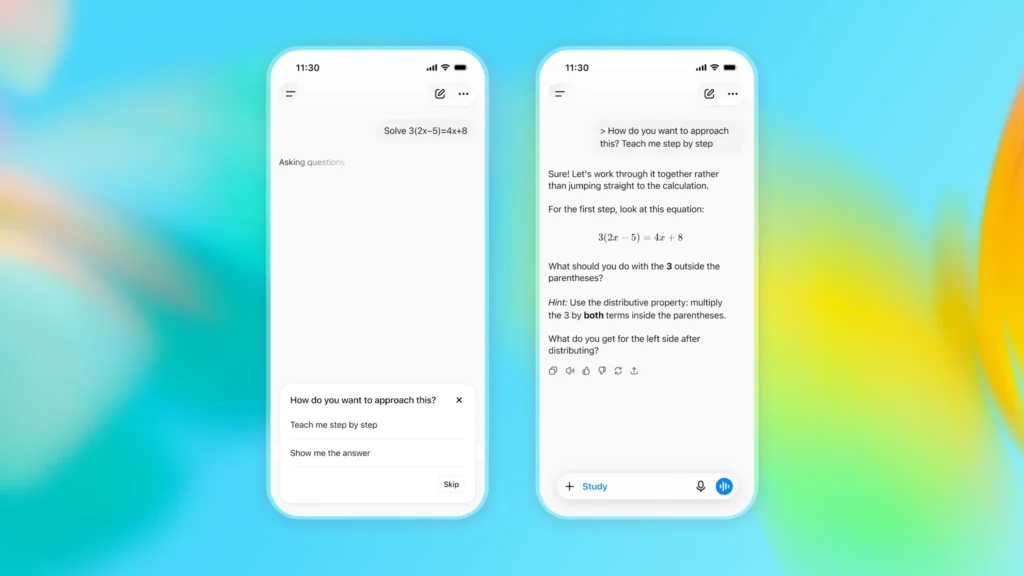
Study Mode is one of the main learning features available within ChatGPT for Teens.
OpenAI introduced Study Mode in July 2025 after working with teachers, scientists, and education specialists. It is designed to help students work through a topic rather than simply receive a completed answer.2
What does Study Mode do?
When Study Mode is active, ChatGPT may:
1. Ask what the student already understands.
2. Break a difficult topic into smaller steps.
3. Ask questions before providing more information.
4. Check whether the student understands an explanation.
5. Give feedback after an incorrect answer.
6. Provide another explanation when needed.
7. Work through examples one step at a time.
The difference matters.
A student who asks, “Give me the answers to these algebra questions,” is using AI differently from a student who asks, “Show me how to solve the first problem, then give me another one to try.”
ChatGPT for Teens is designed to encourage the second type of interaction.
Why Is ChatGPT for Teens Focused on Learning?
AI can produce an answer quickly. That can save time, but getting an answer does not necessarily mean a student understands the subject.
ChatGPT for Teens attempts to address that concern by putting more emphasis on the learning process.
Instead of treating ChatGPT as an answer sheet, students can use it to ask questions, review concepts, practice problems, or test what they know.
Consider these examples:
| Student request | Likely learning value |
| “Answer these 10 homework questions.” | Low |
| “Help me understand the first question, then let me try it.” | Higher |
| “Explain photosynthesis at an eighth-grade level.” | Higher |
| “Quiz me on photosynthesis before my test.” | Higher |
| “Write my paper for me.” | Low |
| “Help me organize the ideas I already have for my paper.” | Higher |
We should not judge educational AI only by how quickly it helps someone finish an assignment.
A better measure is whether the student understands more after using it.
How Do Homework Reminders Work in ChatGPT for Teens?
ChatGPT for Teens includes Responsible Homework Reminders.
If the system detects that a teen appears to be asking ChatGPT to bypass an assignment, it may encourage the student to use Study Mode and work through the material instead.
For example, “Do this worksheet for me” may lead to a different response than “Teach me how to solve question three.”
These reminders do not prevent every form of misuse.
Students still need to follow teacher and school rules about when AI is allowed. The purpose is to place more emphasis on learning instead of simply completing work.
What Are Study Hours in ChatGPT for Teens?
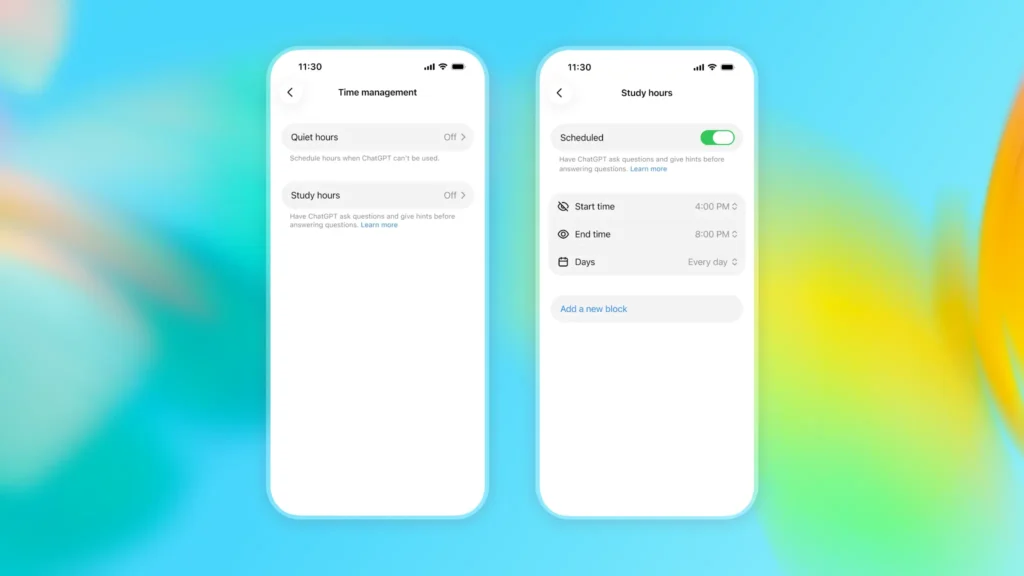
Study Hours let ChatGPT for Teens start eligible new conversations in Study Mode during selected times.
OpenAI says teens or parents can choose Study Hours, while parents or guardians manage the schedule when it is part of a linked parental-control account.
A family could use Study Hours during the period when a teen normally completes homework. When an eligible new conversation begins during that period, the learning-focused setting can already be active.
This gives families a way to create clearer boundaries between general ChatGPT use and school-related use.
Study Hours apply to eligible new conversations in the main ChatGPT experience. They do not apply to existing conversations, GPTs, or Projects.
What Parental Controls Are Available With ChatGPT for Teens?
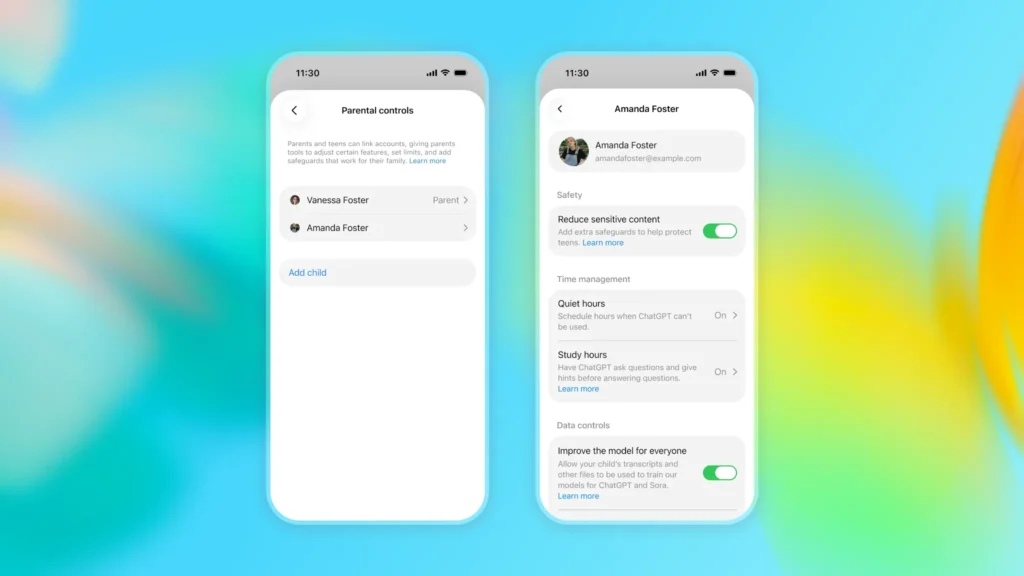
Parents with linked teen accounts can manage selected ChatGPT settings, including making Study Mode the default for new conversations.3
Parents can also manage features such as Quiet Hours and certain account settings.
These controls are intended to give families some influence over how ChatGPT for Teens is used without giving parents complete access to the teen’s account.
Can parents read a teen’s ChatGPT conversations?
No. ChatGPT parental controls do not allow parents or guardians to read or monitor a teen’s conversations, chat history, or real-time activity.
In limited safety situations, OpenAI may notify a parent or guardian when there is a serious concern. Those notifications do not provide the teen’s full conversation transcript.
This distinction matters because parental settings are designed around boundaries and safety rather than continuous monitoring.
What Safety Protections Does ChatGPT for Teens Include?
ChatGPT for Teens applies additional safeguards intended for users under 18.
OpenAI’s published rules for teen users call for greater care around subjects that may create higher risks for younger people.
These areas include:
- Self-harm
- Eating disorders
- Violence
- Dangerous activities
- Certain substances
- Explicit sexual material
- Graphic content
- Certain age-restricted activities, goods, or services
OpenAI’s Model Spec also includes specific principles for users ages 13 to 17 and places additional emphasis on teen safety.4
However, safeguards should not be treated as guarantees.
The Model Spec describes how OpenAI intends its systems to behave. ChatGPT can still misunderstand a question, provide incorrect information, or respond in a way that differs from what was intended.
Parents and teens should therefore treat these protections as an added layer of safety rather than a replacement for human judgment.
How Does ChatGPT for Teens Handle Sensitive Images and Extended Use?
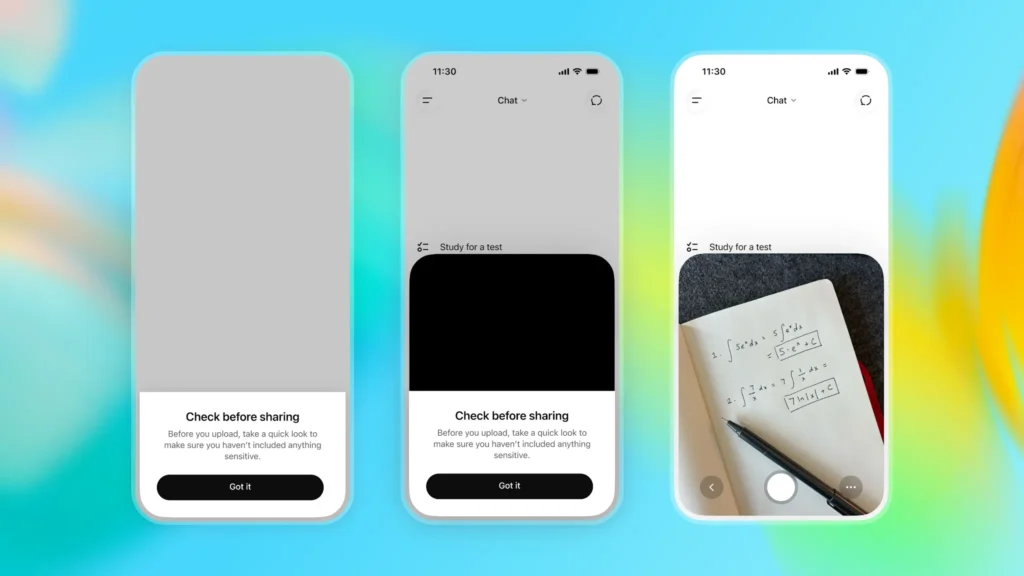
ChatGPT for Teens includes safeguards that go beyond the text of its answers.
For example, teens may receive reminders before uploading sensitive images.
ChatGPT can also encourage younger users to take breaks after extended periods of use.
These features address a broader part of AI use: not only what the system says, but also how someone interacts with it.
Good habits still matter. Teens should be careful about sharing personal information, step away from screens when needed, and involve a trusted person when a situation requires human support.
How Does ChatGPT for Teens Address Emotional Relationships With AI?
ChatGPT uses conversational language, which can sometimes make the system feel more personal than other software.
ChatGPT for Teens adds stronger boundaries for younger users.
OpenAI says ChatGPT should not encourage teens to believe that the system has human feelings or consciousness. It should also avoid romantic language and should not encourage emotional dependence.
That distinction is important.
ChatGPT is software. It does not have feelings, personal experiences, or human relationships.
AI should not replace parents, teachers, friends, counselors, or other trusted people.
Does ChatGPT for Teens Know a User’s Age?
Not always.
OpenAI says ChatGPT for Teens can apply when a person tells ChatGPT that they are between ages 13 and 17 or when its systems estimate that an account belongs to someone under 18.
Age estimation is not the same as knowing someone’s age with certainty.
When OpenAI is uncertain or has incomplete information, it may apply the more protective teen experience.
This approach is intended to reduce the chance that a younger user receives an experience designed for adults.
Does Research Show That Study Mode Helps Students Learn?
Early research provides encouraging evidence, but it should not be treated as final proof.
OpenAI reported a randomized study involving more than 300 college students preparing for neuroscience and microeconomics exams.
In the microeconomics portion of the study, students assigned access to Study Mode scored roughly 15% higher relative to the no-AI control group. In neuroscience, results moved in a positive direction, but the difference was not clearly distinguishable from the control group.
OpenAI has said its analysis is still underway, so these findings should be viewed as early evidence rather than a final conclusion.5
One study cannot show how Study Mode will affect every student, age group, subject, or long-term academic outcome.
OpenAI is also conducting broader long-term research into how AI affects learning.
In a separate project with the University of Tartu and Stanford’s SCALE Initiative, OpenAI’s Learning Outcomes Measurement Suite is being studied with nearly 20,000 students ages 16 to 18 over several months.
This project is broader than Study Mode alone.
Researchers are examining areas such as recall, persistence, independent learning, motivation, and other parts of the learning process.
What Can Students Use ChatGPT for Teens For?
Students can use ChatGPT for Teens for many common learning tasks.
Examples include:
- Learning a new subject
- Reviewing material before a test
- Working through math problems step by step
- Explaining a difficult science concept
- Creating review questions
- Practicing vocabulary
- Checking understanding after reading
- Reviewing notes
- Asking for another explanation
- Taking a short quiz
- Practicing similar problems before attempting an assignment
For example, a student studying the American Revolution could ask ChatGPT to explain one cause at a time and then test their understanding.
A student learning fractions could ask for one example, attempt another problem independently, and then ask ChatGPT to explain any mistake.
A student studying Spanish could use Study Mode to test vocabulary without immediately revealing each answer.
In each case, the student stays involved in the learning process.
How Is ChatGPT for Teens Different From Regular ChatGPT?
ChatGPT for Teens is not simply a separate AI model with a different name.
It is an experience that applies additional protections and learning-focused behavior when OpenAI identifies a user as being under 18.
| Feature | ChatGPT for Teens |
| Study Mode | Supports step-by-step learning |
| Responsible Homework Reminders | Can encourage learning instead of assignment completion |
| Study Hours | Can make Study Mode the default during selected times |
| Teen safety protections | Apply additional safeguards for younger users |
| Parental controls | Allow selected settings to be managed |
| Break reminders | Encourage breaks during extended use |
| Sensitive-image reminders | Warn teens before certain uploads |
| Relationship boundaries | Reinforce that ChatGPT is software, not a person |
The important point is that ChatGPT for Teens is broader than Study Mode.
Study Mode focuses mainly on learning. ChatGPT for Teens combines that feature with safety settings, age-aware behavior, family controls, and additional reminders.
Can Teens Turn Off Study Mode?
Teens can normally turn Study Mode on or off in a regular ChatGPT conversation.
However, linked parental controls can affect how Study Mode is applied.
If a parent or guardian manages Study Mode or Study Hours for a linked teen account, the teen cannot change those parent-managed settings while the accounts remain linked.
Study Hours apply to eligible new conversations in the main ChatGPT experience during scheduled times. They do not apply to existing conversations, GPTs, or Projects.
Quiet Hours work differently.
Quiet Hours can prevent a linked teen from using ChatGPT during selected times, while Study Hours determine when eligible new conversations begin in Study Mode.
Families should still establish their own expectations for using ChatGPT for Teens.
Schools and teachers may also have different rules.
A teacher may allow ChatGPT for studying while prohibiting it on a graded assignment. Another may require students to explain how AI was used.
ChatGPT settings do not replace those rules.
Is ChatGPT for Teens Always Accurate?
No.
ChatGPT for Teens can still make mistakes. Added safety settings and Study Mode do not guarantee that every response will be correct.
Students should check important information against:
- Teacher instructions
- Textbooks
- Class notes
- School-provided resources
- Reliable reference sources
If ChatGPT gives an answer that conflicts with class material, students should ask their teacher for clarification rather than assuming the AI is correct.
This is especially important when accuracy affects a grade or an important decision.
What Is the Best Way to Use ChatGPT for Teens for School?
We see the strongest educational use of ChatGPT for Teens when students ask the system to teach, question, explain, or review rather than complete an assignment for them.
A useful approach is:
1. Explain the goal. Tell ChatGPT what subject or skill is being studied.
2. Share what is already understood. This gives the system a starting point.
3. Ask for one step at a time. Avoid requesting the entire solution immediately.
4. Attempt the work independently. Answer before asking ChatGPT to continue.
5. Ask why. Request an explanation when an answer is incorrect.
6. Check important information. Compare responses with class materials.
7. Repeat difficult areas. Ask for another example when something remains unclear.
For example:
“I have a biology test tomorrow. Use Study Mode to quiz me on cell division one question at a time. Don’t give me the answer until I try.”
That type of request keeps the student involved.
What Should Parents and Students Know Before Using ChatGPT for Teens?
ChatGPT for Teens adds meaningful protections and learning features, but it should not be treated as a replacement for parents, teachers, school policies, or human judgment.
Study Mode can support learning, but students still need to think through problems, check important information, and follow rules about AI use.
Parents should also understand what parental controls can and cannot do.
They can set certain boundaries and manage selected features, but they do not provide access to a teen’s private conversations.
The most useful way to think about ChatGPT for Teens is as an age-aware ChatGPT experience that places greater emphasis on learning and safety.
For schoolwork, the goal should not be to have AI complete the assignment. It should be to use ChatGPT in ways that help students understand the material, practice what they know, and identify what they still need to learn.
Citations
- OpenAI. “Introducing ChatGPT for Teens: Built for Learning, Backed by Protections.” OpenAI, 18 Aug. 2026.
- OpenAI. “Introducing Study Mode.” OpenAI, 29 July 2025.
- OpenAI. “Introducing Parental Controls.” OpenAI, 29 Sept. 2025.
- OpenAI. “Model Spec.” OpenAI Model Spec, 18 Dec. 2025.
- OpenAI. “New Tools for Understanding AI and Learning Outcomes.” OpenAI, 4 Mar. 2026.