WordPress.com has rolled out a built-in AI assistant that sits right inside the editor. So instead of writing in one place, designing in another, and hunting for images somewhere else, the built-in AI assistant lets you handle a lot of that work without leaving WordPress.
And yes—this is different from the “AI writing block” era. The built-in AI assistant is meant to work with the page you’re already editing, including content, layout, and media.¹
What the Built-In AI Assistant Can Do in the WordPress Editor
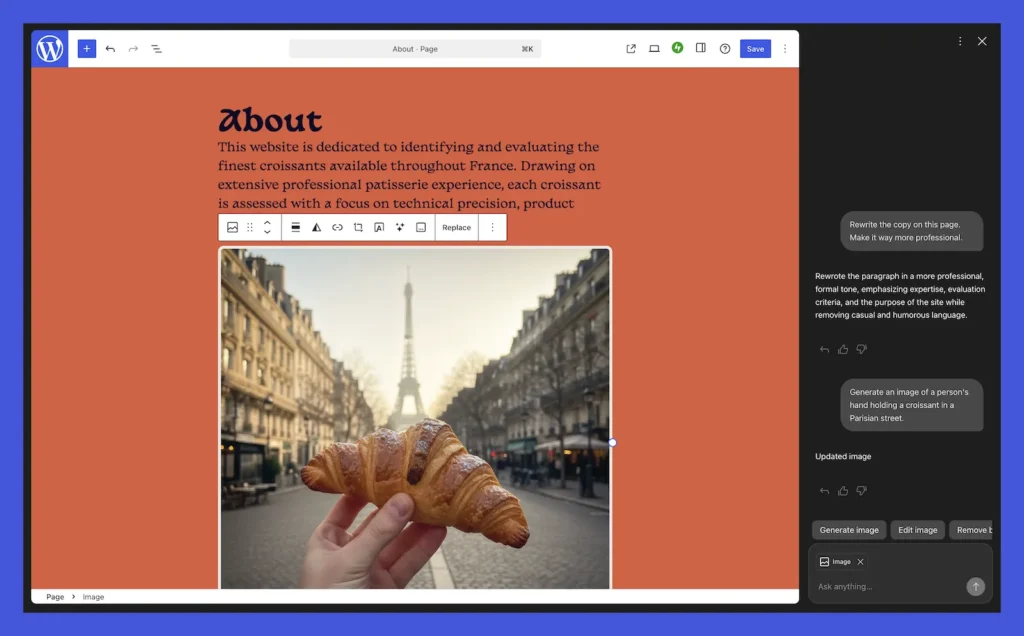
Once you enable it in WordPress.com settings, the built-in AI assistant shows up as a sidebar in the editor and responds to plain-language instructions. It’s built for those moments when you’re staring at a draft and thinking, “This is close… but not quite.”
Here are a few things the built-in AI assistant can help with:
- Rewrite a paragraph to sound clearer
- Tighten up an intro or summary
- Suggest headline options
- Translate content
- Turn a rough outline into a first draft
- Apply changes to page sections (layout and styling)¹²
Where the Built-In AI Assistant Is Available
This part trips people up, so it’s worth being direct.
The built-in AI assistant described here is native to WordPress.com. WordPress.com explains how to enable the feature through site settings (and notes plan eligibility).
If you run self-hosted WordPress.org, you won’t automatically get the same built-in experience. Many WordPress.org users rely on plugins for AI features, including Jetpack AI tools and other options.³
Built-In AI Assistant vs Jetpack AI Assistant
Jetpack’s AI Assistant (introduced earlier) focused mostly on writing tasks—drafting, rewriting, tone changes, and similar editor help.
The newer built-in AI assistant goes beyond writing. Coverage of the rollout notes that it can also help with layout and style changes and ties into media workflows.
So if Jetpack AI was mostly “help me write this,” the built-in AI assistant is closer to “help me polish this page,” including the way it looks and the images it uses.²
Built-In AI Assistant for Images and the Media Library
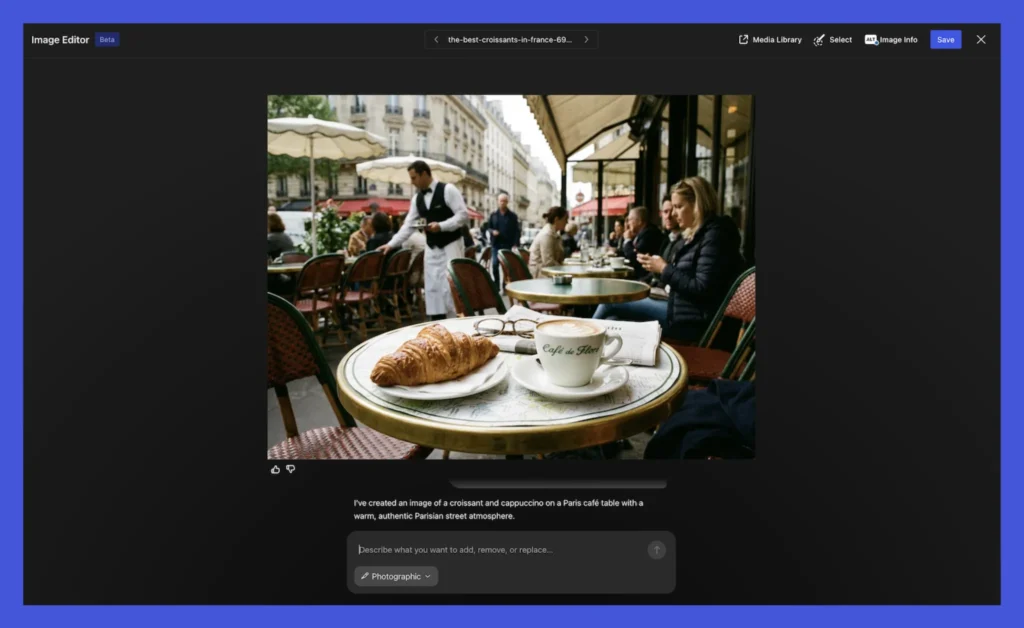
One of the more practical pieces: image creation and editing from inside WordPress.
Reporting says the built-in AI assistant can generate and edit images in the Media Library and references Google “Nano Banana” models for image tasks.⁴ That means you can create a simple featured image or adjust an existing visual without bouncing out to a separate platform.⁴
If you publish a lot, that alone can save time—because image work is usually where momentum goes to die.
Built-In AI Assistant for Notes and Team Review
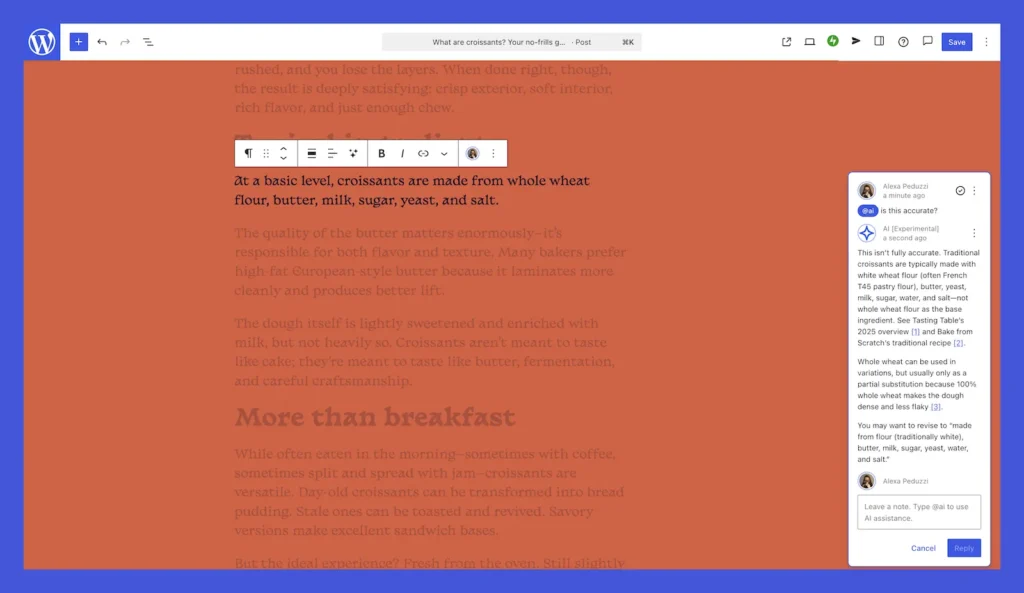
If more than one person touches your content, this part matters.
The Verge notes that WordPress.com’s assistant can be called in collaborative notes using “@ai,” which can help during review—like when someone wants a cleaner headline, a shorter paragraph, or a different phrasing without opening another tool.
It’s a small workflow change, but it keeps editing conversations tied to the actual page.⁴
Why This Built-In AI Assistant Rollout Matters
WordPress isn’t some niche platform. W3Techs puts WordPress at 42.7% of all websites as of February 24, 2026.⁵
So when WordPress.com adds a built-in AI assistant, it’s not just another feature announcement—it’s a signal that AI is becoming part of everyday publishing inside the tools people already use.⁴
This doesn’t mean the built-in AI assistant replaces strategy, research, or good editing. But it does make it easier to get from “rough draft” to “publishable” without breaking your flow.¹
FAQ: Built-In AI Assistant in WordPress
Is the built-in AI assistant part of WordPress.org core?
No. The built-in AI assistant covered here is a WordPress.com feature. WordPress.org users typically use plugins or other add-ons for AI tools.
Can the built-in AI assistant generate images?
Yes. Reporting says it can generate and edit images in the Media Library and references Google “Nano Banana” models for that image work.
How do you enable the built-in AI assistant?
WordPress.com documents activation through site settings under AI tools (plan eligibility applies).¹³
Citations
- Burt, Ronnie. “Introducing the WordPress AI Assistant — Now Built Into WordPress.com.” WordPress.com Blog, 17 Feb. 2026.
- Perez, Sarah. “WordPress.com Adds an AI Assistant That Can Edit, Adjust Styles, Create Images and More.” TechCrunch, 17 Feb. 2026.
- “Improve a Page or Post with AI.” WordPress.com Support, Automattic, 24 Dec. 2025.
- Porter, Jon. “WordPress’ New AI Assistant Will Let Users Edit Their Sites with Prompts.” The Verge, 17 Feb. 2026.
- “Usage Statistics and Market Share of WordPress.” W3Techs, 24 Feb. 2026.