An ai personal assistant is an app that uses AI to take over small but time-consuming tasks in real life, like planning your day, organizing messages, or researching purchases. The 10 ai personal assistant picks below stand out because they’re simple to use, work with popular apps, and genuinely save time.
Key takeaways
- You don’t need to be “into tech.” Each ai personal assistant on this list works through simple, natural conversations.
- Different assistants excel at different jobs. Some ai personal assistant tools focus on your calendar, others on search, writing, or meetings.
- You can mix and match. Using two or three ai personal assistant apps together usually covers most of your day.
- Start free, upgrade only if needed. Most ai personal assistant options have generous free tiers.
How were these 10 ai personal assistant tools selected?
These ai personal assistant picks were chosen using four simple filters:
- Real-life usefulness: They must handle everyday tasks like planning, writing, and scheduling, not just demos or one-off tricks.
- Ease of use: You should be able to get value with plain language, not long tutorials.
- Integrations: Good ai personal assistant apps connect with email, calendars, and storage tools you already use.
- Trust and support: Backed by active companies with clear privacy and security information.
Quick comparison of the 10 ai personal assistant apps
| # | AI Personal Assistant | Best for | Everyday examples | Free plan? |
| 1 | ChatGPT | All-purpose help | Planning, writing, summarizing¹ | Yes |
| 2 | Google Gemini | Google users | Gmail, Docs, and Drive help² | Yes |
| 3 | Microsoft Copilot | Windows & Office | PC tasks, documents, email³ | Yes (limited) |
| 4 | Perplexity | Search & decisions | Research with sources⁴ | Yes |
| 5 | Reclaim AI | Time blocking | Auto-scheduling tasks | Yes |
| 6 | Motion | Daily planning | Turning to-dos into a schedule | Trial, then paid |
| 7 | Notion AI | Notes & docs | Turning notes into plans | Add-on |
| 8 | Otter.ai | Meetings | Transcribing and summarizing calls | Yes |
| 9 | Lindy | Workflows | Handling repeated admin work | Trial / freemium |
| 10 | Saner.AI | ADHD-friendly flow | Organizing scattered info⁵ | Yes |
10 ai personal assistant picks that actually help with real-life
1. ChatGPT: flexible ai personal assistant for mixed work and life
ChatGPT is a general-purpose ai personal assistant that can plan your week, draft messages, summarize files, and brainstorm ideas.¹
Where it shines:
- Turning rough thoughts into clear emails, posts, or outlines
- Planning weeks, trips, and routines based on your real schedule
- Summarizing long PDFs, articles, or transcripts into key points¹
Best for: people who want one ai personal assistant they can ask almost anything.
2. Google Gemini: ai personal assistant built into your Google world
Gemini is Google’s ai personal assistant, tightly connected to Gmail, Calendar, Docs, Drive, and Android.²
Where it shines:
- Summarizing long email threads so you see the main point quickly²
- Pulling tasks and dates out of Docs or PDFs and listing next steps
- Drafting replies, trip ideas, and event descriptions from your inbox²
Best for: anyone already living in Gmail, Google Calendar, and Drive.
3. Microsoft Copilot: ai personal assistant for Windows and Microsoft 365
Microsoft Copilot is an ai personal assistant built into Windows, Edge, and Microsoft 365 apps like Word, Excel, and Outlook.³
Where it shines:
- Summarizing long email chains and documents in Outlook and Word³
- Creating draft presentations and documents from short prompts
- Helping with everyday questions right from the Windows taskbar³
Best for: people who work mostly in Microsoft 365 and on Windows PCs.
4. Perplexity: ai personal assistant for search, research, and quick decisions
Perplexity is an ai personal assistant focused on search. It answers questions with short explanations plus links to sources.⁴
Where it shines:
- Comparing products before you buy, with references you can check⁴
- Planning trips, routes, and activities with up-to-date info
- Getting quick rundowns of news topics from several outlets⁴
Best for: people who care about seeing sources alongside answers.
5. Reclaim AI: calendar-first ai personal assistant for time and routines
Reclaim AI is an ai personal assistant centered on your calendar. It automatically schedules tasks, habits, and meetings so your week fills in intelligently.⁵
Where it shines:
- Turning habits (“exercise three times a week”) into real calendar blocks
- Rescheduling tasks when your day gets crowded
- Protecting focus time so deep work actually happens⁵
Best for: people whose main stress is time management.
6. Motion: ai personal assistant that builds a daily plan for you
Motion is an ai personal assistant that turns long to-do lists and project tasks into a realistic, hour-by-hour schedule.
Where it shines:
- Auto-prioritizing tasks based on deadlines and importance
- Rebuilding your daily plan when new meetings pop up
- Helping teams track work while still respecting personal time
Best for: busy professionals juggling many tasks and meetings.
7. Notion AI: workspace ai personal assistant for notes and documents
Notion AI is an ai personal assistant that lives inside Notion, working with your existing pages, docs, and databases.
Where it shines:
- Turning messy notes into clean summaries and action lists
- Drafting project briefs, job descriptions, or study guides
- Pulling key points out of long pages so you see what matters
Best for: people who already use Notion to manage work, school, or side projects.
8. Otter.ai: meeting-focused ai personal assistant for notes and follow-ups
Otter.ai is an ai personal assistant for conversations. It records, transcribes, and summarizes meetings, video calls, and in-person talks.
Where it shines:
- Capturing live notes for Zoom, Teams, or in-person discussions
- Highlighting action items and decisions so nothing is missed
- Sharing clear recaps with people who couldn’t attend
Best for: anyone who spends a lot of time in meetings and hates manual note-taking.
9. Lindy: automation-first ai personal assistant for repeated admin work
Lindy is an ai personal assistant that can handle repeated computer tasks, especially around email and basic workflows.
Where it shines:
- Drafting and sending routine emails, follow-ups, or reminders
- Assisting with outreach for sales, hiring, or support
- Acting like light “ops support” for solo workers and small teams
Best for: people whose inbox and admin work eat up most of their day.
10. Saner.AI: ADHD-friendly ai personal assistant for messy digital lives
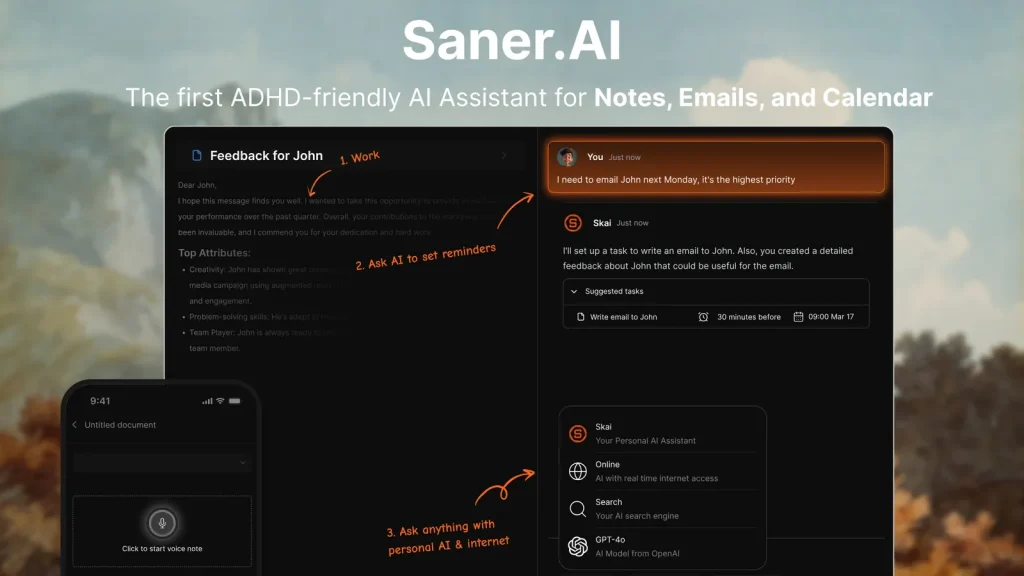
Saner.AI is an ai personal assistant built for people with scattered notes, tabs, and reminders, especially those with ADHD.⁵
Where it shines:
- Pulling tasks and ideas together from different apps and notes⁵
- Turning loose thoughts into organized lists and next steps
- Keeping reminders and information in one calmer, less busy view⁵
Best for: anyone who feels overwhelmed by traditional productivity apps.
How to pick the right ai personal assistant for your daily routine
- If time is the main issue: Start with Reclaim AI or Motion as your main ai personal assistant, then add ChatGPT for planning and writing.
- If you live in one ecosystem: Choose Gemini for Google or Copilot for Microsoft as your core ai personal assistant.
- If your brain runs fast and scattered: Try Saner.AI plus a general ai personal assistant like ChatGPT for planning and thinking support.⁵
Frequently Asked Questions
Do I need to be technical to use an ai personal assistant?
No. Most ai personal assistant tools are built for everyday language. You type or speak what you want—like “Plan my week around work, kids, and gym time”—and the assistant suggests a plan. You can always adjust the result if something feels off.
Is a free ai personal assistant enough for most people?
For many people, yes. Free plans usually cover basic chat, planning, summarizing, and light integrations. You only really need paid plans if you hit usage limits, want deeper app connections, or rely on your ai personal assistant for work every day.
Is it safe to connect an ai personal assistant to my email or calendar?
Most major ai personal assistant providers explain how they handle and store data. As with any important app, review permissions, avoid sharing passwords in chat, and turn off connections you don’t use. If something feels uncomfortable, keep sensitive items out of the assistant.
Conclusion
Choosing the right ai personal assistant comes down to what part of your day needs the most support. Some apps help you stay organized, others simplify research or lighten the load of emails and meetings. The best mix is usually one all-purpose assistant plus a tool that fits your specific routine. Start with the free versions, test a few combinations, and lean into the ones that actually make your day feel easier. Over time, the right ai personal assistant setup becomes something you use without thinking — just a simple way to keep life moving without the extra stress.
Citations
- OpenAI. “ChatGPT Capabilities Overview.” OpenAI Help Center, OpenAI, Accessed 15 Nov. 2025.
- Google. “Meet Gemini: Your AI Assistant.” Gemini, Google, Accessed 15 Nov. 2025.
- Microsoft. “What an AI Assistant Can Do for You.” Microsoft Copilot, Microsoft, 22 Oct. 2025.
- Perplexity AI. “Getting Started.” Perplexity Hub, Perplexity AI, Accessed 15 Nov. 2025.
- Saner.AI. “Best AI Personal Assistants Guide: We Tested the Top 14+ Apps.” Saner.AI Blog, Saner.AI, 23 June 2025.