
Key Takeaways
- The Comet Assistant is an AI tool built into the browser that performs actions for you, such as comparing product prices or filling out simple forms.
- Its core design ensures full transparency, allowing users to watch every step it takes in a dedicated viewing panel.
- Users maintain authority by choosing exactly when the tool should help and when they prefer to browse manually.
- The assistant includes built-in safety checks, requiring it to pause and ask for permission before any sensitive action, like completing an online purchase.¹
What is the Comet Assistant?
The Comet Assistant is a capable AI tool built right into a web browser. It is designed to act on your requests, meaning it can do things on the internet for you, instead of just searching for information. This is like having a reliable digital partner that can take a simple request—such as “Find the cheapest flights to Chicago next month”—and actively carry out the series of steps needed to complete the task. This powerful feature aims to remove tedious work from the browsing experience and ensures the user always has the final say.¹
How Does the Comet Assistant Take Action on Websites?
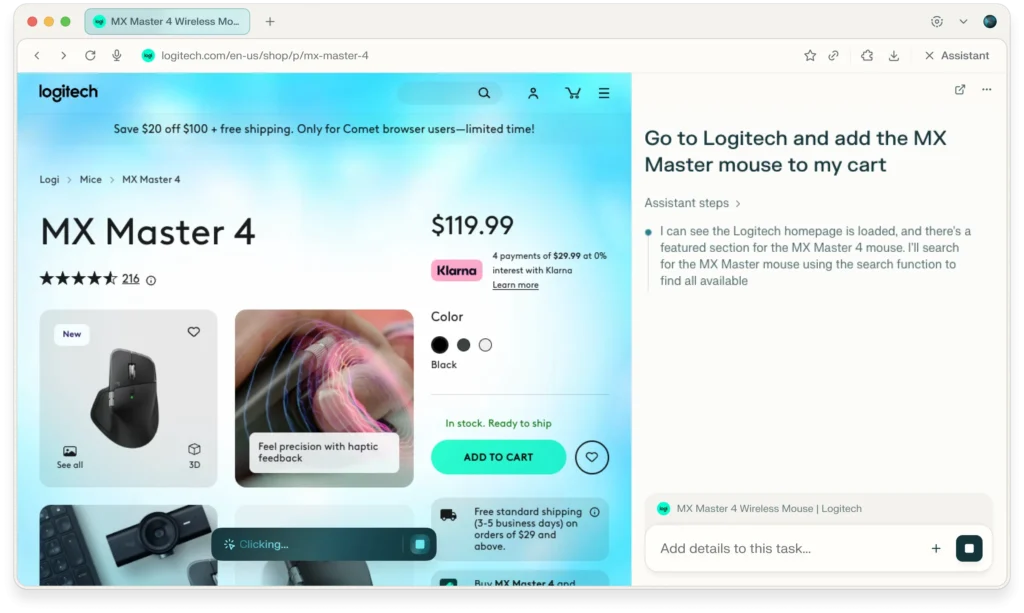
The Comet Assistant moves beyond traditional search. Its ability to perform tasks is based on three foundational rules that ensure its power is balanced with user trust and control.
The Three Core Rules for the Assistant
The development of the assistant is guided by strict principles that ensure the technology always works for the user:
- Transparency: The assistant must openly show all of its actions and its thinking process.
- User Control: The user must be able to choose when to involve the assistant and stop it at any time.
- Smart Caution: The assistant must recognize important situations and pause to ask for permission before proceeding with any sensitive action.
These rules ensure the assistant operates like a thoughtful partner, handling routine steps while asking for guidance on critical decisions.
Why Can We Trust the Assistant?
Trust in any automated tool requires seeing how it operates. The Comet Assistant tackles this by making its entire work process visible to the user.
Watching the Work in a Viewing Panel
When a task is delegated, the assistant’s progress is logged in a visible Viewing Panel on the side of the browser. In this panel, the user can watch the assistant as it performs actions, seeing clear indicators of the pages it visits, the links it clicks, and the information it extracts. This constant, step-by-step visibility eliminates the guesswork and helps the user confirm the AI is working correctly.
Instant Control and Guidance
Transparency is only valuable if the user can intervene. The Viewing Panel provides clear “Stop” and “Guide” controls that are accessible at all times. If the assistant misinterprets a request or begins a task incorrectly, the user can immediately interrupt the process and provide new, better instructions. This quick action ensures the user can always redirect the assistant, preventing errors and ensuring the final result is accurate.
How Do We Decide When the Assistant Helps?
The Comet Assistant is a resource that adapts to the user’s preferred way of working. The user has complete control over when and how the assistant gets involved.
Three Modes for Getting Work Done
The user can easily switch between working manually and delegating tasks to the assistant.
- Browse Yourself: The user handles all web interaction personally. The assistant remains inactive and out of the way.
- Give Permission Once: The user allows the assistant to handle a single task, such as comparing a few products. Once the task is complete, the assistant waits for the next explicit command.
- Let It Suggest: The user allows the assistant to offer help automatically when it detects an opportunity to be useful, such as summarizing a long article or filling in a repetitive form field.
This system of choice guarantees that the assistant is a strategic resource that is only deployed with the user’s consent, preventing unwanted interference.²
Safety First: Protecting You During Big Decisions
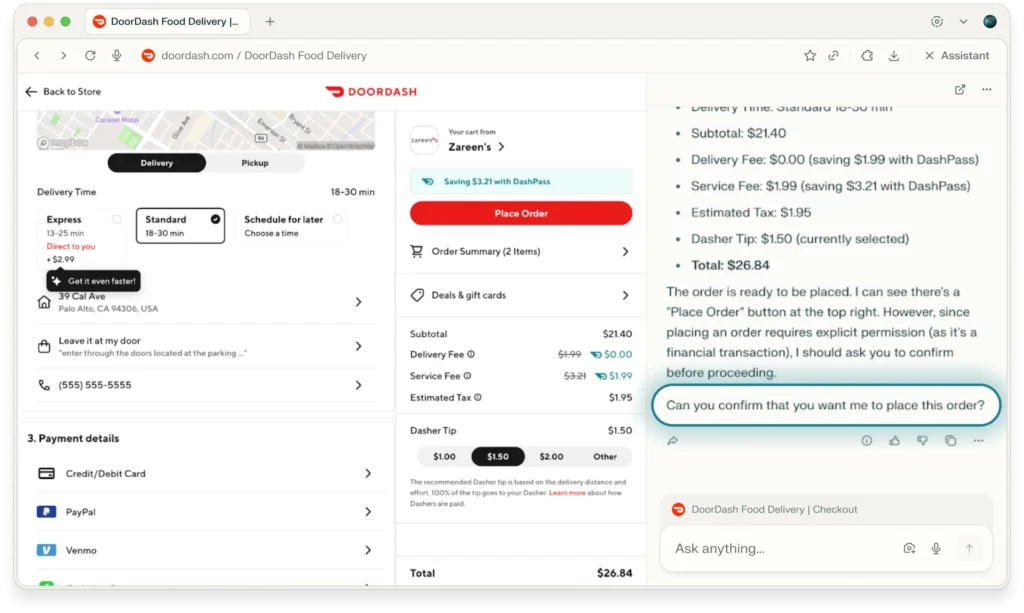
A crucial part of the assistant’s design is the ability to recognize tasks that have real-world consequences, such as those involving money or personal information. The assistant is programmed with built-in safety checks for these moments.
When the assistant encounters a task that involves a high-stakes decision, it halts operations instantly. It presents the user with a straightforward question, asking for explicit confirmation before proceeding. For example, if the task is to purchase an item, the assistant will pause before hitting the “Buy Now” button. It will also pause before logging into a secure site or submitting a form with sensitive data. This “smart caution” is key to maintaining security and trust, as the user remains the ultimate authority for any critical step.²
How the Assistant Gets Better Over Time
Having to repeat your preferences, interests, or specific needs to a digital tool is frustrating. The Comet Assistant has features that let it remember key details from your interactions, making its future help more precise and relevant.
Creating a Personalized Experience
This “personal learning” feature means the assistant can securely keep track of preferences, such as your favorite brands or common travel destinations. When the user asks a subsequent question, the assistant uses this information to deliver more precise and tailored answers. This ensures that the system is operating from a personalized understanding of the user’s needs, making every interaction more efficient.⁴
You Control What Is Remembered
The user owns the personal information the assistant stores. We provide clear controls that allow the user to review what the assistant has remembered, delete specific entries, or turn the entire memory feature off if they prefer. For added security and privacy, the assistant automatically disables this feature whenever the user chooses to browse in private or incognito mode.
What Types of Multi-Step Tasks Can Be Handled?
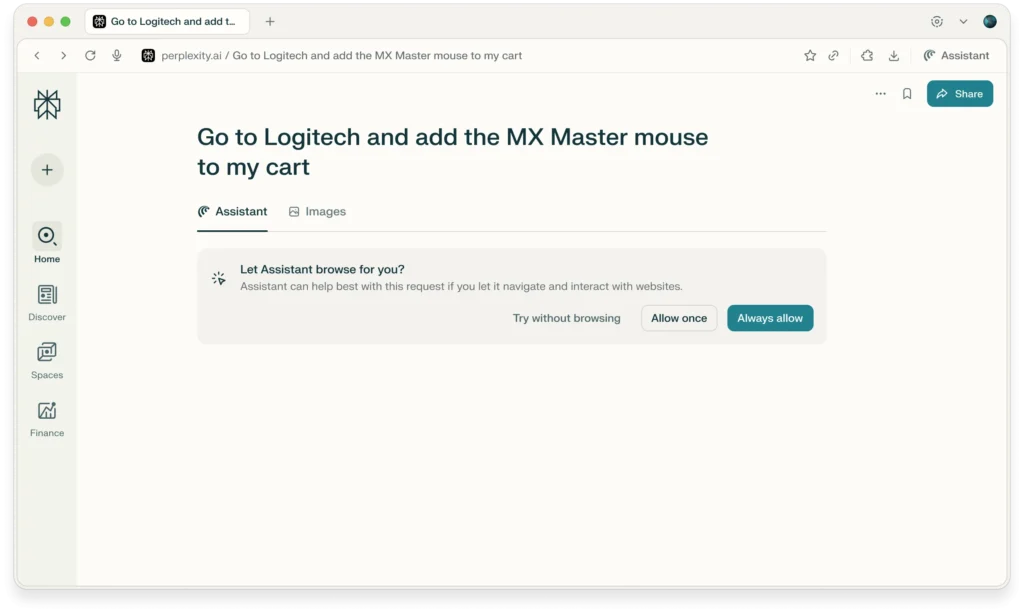
The power of the assistant is not just in searching, but in actively doing the work of browsing. By interpreting your requests and taking action on websites, it handles complex series of steps that save you time.
The assistant can be delegated tasks that would typically require juggling many browser tabs, copy-pasting, and manual comparison.
- Information Comparison: Ask the assistant to open five articles on a topic, read them, and highlight the main differences or conflicting facts.
- Routine Administration: Direct the assistant to find a specific document in your email inbox and download it (with your account permissions).
- Shopping: Request that it search across three different online stores, compare the total price, and present the best option in a clear, easy-to-read list.³
- Summarization: The assistant can quickly summarize the main points of a lengthy article or even a video, which significantly aids in efficient research.⁵
By delegating these multi-step tasks, the user can focus their energy on making decisions rather than performing repetitive digital work.
Frequently Asked Questions
Is the Comet Assistant a completely new web browser?
The Comet Assistant is a powerful feature built into the Comet browser. The browser itself is based on the same common and reliable foundation as many other popular browsers, which means you can easily import your existing bookmarks and settings.
Does the assistant cost extra to use?
The Comet browser is free to download and use. However, some of the assistant’s most powerful capabilities, which involve complex, multi-step tasks, may require a paid subscription for full access.
How does the assistant make sure the information is accurate?
The assistant provides citations for its answers. This means it tells you exactly which web pages and sources it used to gather its facts, allowing you to easily check the original information for yourself.
Will the assistant interrupt my browsing all the time?
No. You control the level of interference. You can set the assistant to only act when you specifically ask it to, keeping it quiet for the rest of your time online.
How does the assistant protect against security risks like fake websites?
The system includes built-in security features, such as tracker and ad blocking. Furthermore, its transparent design lets you see the website it is visiting in the Viewing Panel, allowing you to stop the process if the site looks suspicious.
Citations
- Perplexity Team. “Comet Assistant Puts You in Control.” Perplexity Blog, Perplexity, 14 Nov. 2025.
- Perplexity Team. “Ways to Use Comet.” Perplexity, 2025.
- Circelli, Ruben. “I Switched to Perplexity’s AI Comet Browser for a Week. Is It the Future or Just Hype?” PCMag, Ziff Davis, 5 Aug. 2025.
- Perplexity Team. “Introducing AI Assistants with Memory.” Perplexity Blog, Perplexity, 26 Nov. 2025.
- Seraphic Security Team. “Perplexity Comet Browser: Key Features, Reviews & Security Tips.” Seraphic Security, 25 Nov. 2025.